> For the complete documentation index, see [llms.txt](https://docs.hostedgraphite.com/llms.txt). Markdown versions of documentation pages are available by appending `.md` to page URLs; this page is available as [Markdown](https://docs.hostedgraphite.com/additional-features/logging.md).
# Logging
Hosted Graphite now supports log ingestion and visualization through a managed Loki backend.
Contents:
* [Add a Loki Data Source](#add-a-loki-data-source)
* [Install and Configure a Log Collector](#install-and-configure-a-log-collector)
* [Query Logs on Your Dashboards](#query-logs-on-your-dashboards)
### [Add a Loki Data Source](#add-a-loki-data-source)
**Reach out to our support channel and we will create a Loki Key and Data Source for your account.** Once created, you can locate your Loki Key in Access ⇒ Sharing:
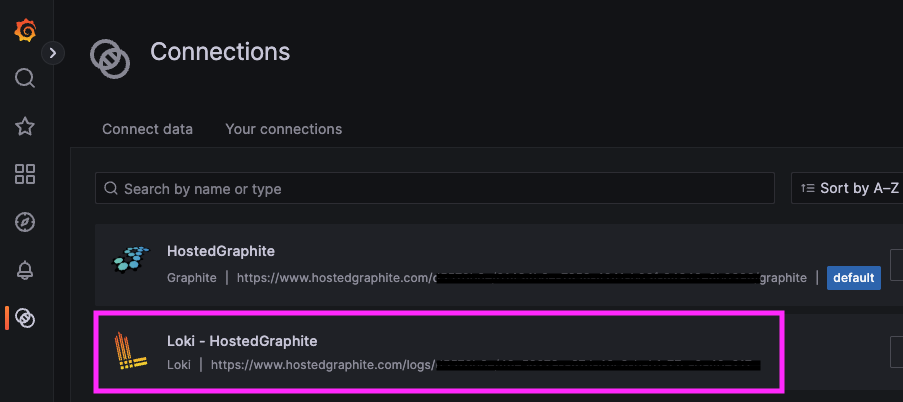
And you can locate your Loki Data Source in Dashboards ⇒ Connections ⇒ Your Connections:
You will be able to use this Data Source in your dashboards to query and visualize logs that are ingested to our Loki backend (7 day log retention).
NOTE: Logging is not currently available for users that have enable the Hosted Graphite Add-on from the Heroku Marketplace. Contact us at: to learn how to migrate your Heroku HG account(s) to a dedicated HG account and take advantage of all available features like Logging and MCP.
### [Install and Configure a Log Collector](#install-and-configure-a-log-collector)
MetricFire supports log forwarding using OpenTelemetry Contrib, Promtail, and Alloy. You must install one of these collectors in your server(s) and this guide uses [Promtail](https://grafana.com/docs/loki/latest/send-data/promtail/) - which reads log files like **/var/log/syslog** and forwards them to our Loki endpoint.
#### Install Promtail (Ubuntu)
{% tabs %}
{% tab title="AMD64" %}
wget
sudo apt-get install -y ./promtail\_3.5.3\_amd64.deb
{% endtab %}
{% tab title="ARM64" %}
wget
sudo apt-get install -y ./promtail\_3.5.3\_arm64.deb
{% endtab %}
{% endtabs %}
#### Configure Promtail
Edit Promtail’s configuration file, generally located at: **/etc/promtail/config.yml**
```yml
server:
http_listen_port: 9080
grpc_listen_port: 0
positions:
filename: /tmp/positions.yaml
clients:
- url: https://@www.hostedgraphite.com/logs/sink
scrape_configs:
- job_name: varlogs
static_configs:
- targets:
- localhost
labels:
host:
job: varlogs
__path__: /var/log/*log
```
Make sure to include your HG API-KEY and HOST-NAME of the server. You may also modify the job\_name, labels, and path values for more specific collection/querying. Save your config file and restart Promtail to forward your logs.
```
sudo systemctl restart promtail
sudo systemctl status promtail
```
You may also need to assign permissions to allow Promtail to read your /var/\*log files:
```
sudo usermod -aG adm promtail
sudo systemctl restart promtail
```
### [Query Logs on Your Dashboards](#query-logs-on-your-dashboards)
Once Promtail is sending logs and the Loki data source is configured, create a new dashboard panel. You can create custom [LogQL](https://grafana.com/docs/loki/latest/query/) queries to visualize your log data in meaningful and useful ways. Add a new panel, set the **Data Source to Loki - HostedGraphite,** and switch the query editor to "Code" mode.
#### Basic Log Query
View **/var/log/\*** lines forwarded by your server - you can query by job, host, and/or filename:
```
{job="varlogs", host="", filename="/var/log/syslog"}
```
#### Filter by Content
```
{job="varlogs", host=""} |= "ERROR"
```
You can filter using:
* `|=` substring match
* `|~` regex
* `|=` and `!=` content filtering
Loki supports full LogQL for powerful [parsing and field extraction](https://grafana.com/docs/loki/latest/query/log_queries/).
#### Graph Log-Based Metrics
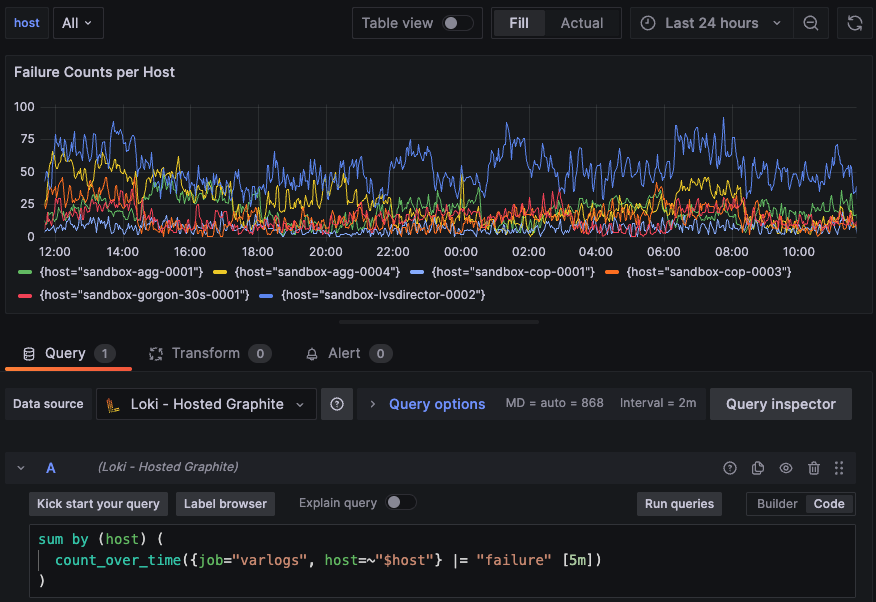
Loki allows you to convert logs into metrics using count\_over\_time() and [similar functions](https://grafana.com/docs/loki/latest/query/metric_queries/#log-range-aggregations). This turns raw log patterns into quantifiable data that you can graph and alert on. Examples:
**Failure Counts per Host:**
```logql
sum by (host) (
count_over_time({job="varlogs", host=""} |= "failure" [5m])
)
```
**Cron executions 5m Sum:**
```logql
sum by (host) (
count_over_time({job="varlogs", host=""} |= "cron" [5m])
)
```
**Compare Logs and Metrics For Enhanced Visibility**
By correlating log data with your existing Graphite metrics, you can observe both system behavior and the underlying events that contribute to changes in performance. This combined view helps you identify patterns to diagnose issues faster, and gain context behind metric fluctuations.
The MetricFire Blog has detailed articles around log + metric monitoring for popular services like [MySQL](https://www.metricfire.com/blog/visualize-logs-alongside-metrics-a-complete-guide-for-monitoring-slow-mysql-queries/), [PostgreSQL](https://www.metricfire.com/blog/visualize-logs-alongside-metrics-complete-observability-for-slow-postgresql-queries/), [Nginx](https://www.metricfire.com/blog/nginx-performance-monitoring-loki-logs-and-telegraf-metrics/), [Elasticsearch](https://www.metricfire.com/blog/visualize-logs-alongside-metrics-complete-observability-elasticsearch-performance/), and many more! Reach out to us at to enable Loki Logging for your account!