> For the complete documentation index, see [llms.txt](https://docs.hostedgraphite.com/llms.txt). Markdown versions of documentation pages are available by appending `.md` to page URLs; this page is available as [Markdown](https://docs.hostedgraphite.com/agents-guide/k8-telegraf-daemon.md).
# K8 Telegraf Daemon
Deploy Telegraf as a daemonset into your Kubernetes environment to collect and forward performance metrics from your clusters
* Clone the telegraf-daemonset repository from the MetricFire GitHub:
```
telegraf-daemonset/
├── kustomization.yaml
└── resources/
├── config.yaml
├── daemonset.yaml
├── namespace.yaml
├── role.yaml
├── role-binding.yaml
└── service_account.yaml
```
* Add your **HG API KEY** to the resources/config.yaml file
* Point your kubectl command line utility to the context of the cluster you wish to monitor: `kubectl config use-context`
* Deploy the kustomization.yaml manifest into your cluster: `kubectl apply -k .`
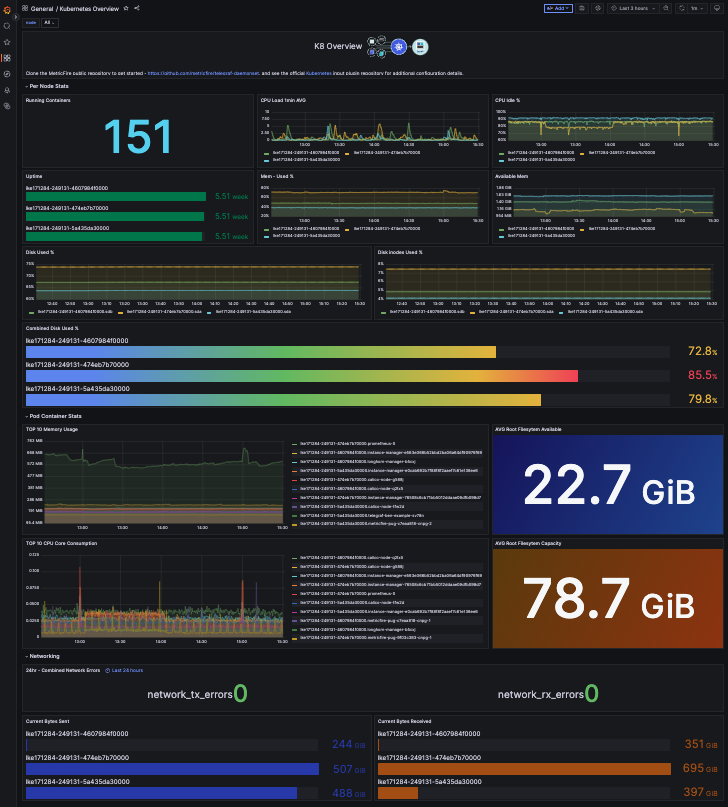
* Generate the **Kubernetes Overview** dashboard from our [Dashboard Library](https://docs.hostedgraphite.com/dashboard-and-graphs/dashboard-library) to visualize performance metrics from your nodes, containers, pods, and more!
Kubernetes Overview dashboard
* See more configuration options in the official GitHub repo [HERE](https://github.com/influxdata/telegraf/blob/release-1.31/plugins/inputs/kubernetes/README.md), and our detailed blog article around deploying the Telegraf daemonset [HERE](https://www.metricfire.com/blog/guide-to-monitoring-kubernetes-using-telegraf-as-a-daemonset/).